
Fog of war
Shared vision
The fog clears around every player's units the same way it clears around yours: you see what every player sees, terrain included.
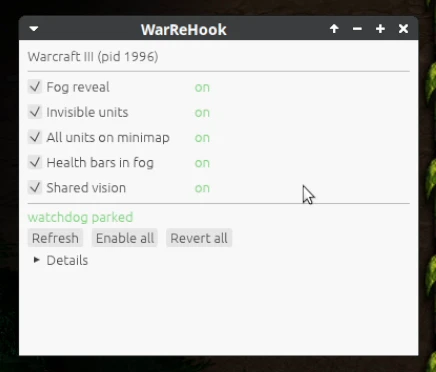
Enemy armies in the fog, Blademasters in Wind Walk, every unit on the minimap, with their health bars. Tick what you want in a small window next to the game.
Turn each one on or off at any time during a match.
Fog of war
The fog clears around every player's units the same way it clears around yours: you see what every player sees, terrain included.

Main map
Revealed units get the same health bars as visible enemies, so you know which army is hurt and which hero is about to go down.

Main map
Enemy units in the fog are drawn on the map, so you see armies coming, expansions going up and heroes creeping before you ever scout them. They stay unclickable, so nothing you send the other players changes: no desyncs, no getting disconnected mid-game.

Main map
Wind Walk, Shadowmeld, Invisibility and every other undetected unit are drawn like any other unit. No more surprise Blademasters, no more Shades watching your base.

Minimap
Every unit on the map gets its dot, fog or not. One glance at the corner of the screen shows where every army is.
Every race
Works the same whichever race you or your opponents play.

WarReHook runs outside the game, in its own small window. No code goes into the game: it only reads and writes the game's memory.

A desync gets you disconnected from the game by Battle.net. Other map hacks let you click units your game isn't supposed to see; the other players' games can't agree with that selection or order, and you're out. WarReHook only changes what your screen draws: vision data, selections and orders, everything the players' games compare, stay exactly as the game made them.

No game files are changed. Everything lives in memory and is gone when the game closes.

Leave the window open across matches and game restarts. It reconnects to the game on every click.
One file, no installer: warrehook.exe.
A monthly subscription. No email, no sign-up here: pay with Monero and your license key and download unlock by themselves.
Waiting for payment…
New: run warrehook.exe, choose Register, pick a username and password and paste this key. After that you just log in. The account is tied to that computer.
Renewing: choose Add key with your username and password and paste this key: it adds 30 days to your account.
Card and PayPal payments are being built. Monero only for now.
WarReHook is made for Windows. It is developed against the game running under Proton/Wine, where it works too, but Windows is what it's built and supported for.
No. Everything happens in the game's memory. When the game exits the changes are gone, so you tick the features again after each launch; the WarReHook window can stay open in between.
No. Multiplayer Warcraft III keeps every player's game in step and checks that they agree. When one player's game stops agreeing with the others, that's a desync, and the Battle.net server disconnects that player from the match. That's how other map hacks get you kicked: they let you select or right-click units your game isn't supposed to see, your game sends that, and the other players' games, which know you can't see those units, disagree. WarReHook changes only drawing: the fog data the games check against each other is untouched, and revealed units can't be selected or right-clicked, so you never send a selection or order the other games would disagree with.
That's on purpose. Selection, hover and targeting use the game's real visibility, which WarReHook leaves alone. Revealed units are there to see, not to click: clicking a unit your game isn't supposed to see is exactly what desyncs other map hacks and gets you disconnected.
Either no match is running yet (start one and press Refresh), or the game was just updated and WarReHook doesn't support the new version yet. Once it does, log out and back in to pick it up.
You get it on this page right after paying. Redeem it once in WarReHook's window (Register) to create your login; that login then works on the computer you registered it on. Lost your key? Open your order link again: the key stays there.
Each payment gives you a key for 30 days. Monero can't charge you again by itself, so nothing renews automatically: before your time runs out, buy again here and enter the new key in WarReHook's window under Add key (same username and password). The days are added to your account. If it already ran out, WarReHook asks you to log in again; Add key brings it back.
No. See the warning below.